DisplayXR Play

Your games, in real 3D.

Existing games rendered from two eyes on glasses-free 3D displays. Steam on Linux, Windows and Android, through one runtime. Real stereo, never a depth trick. Single-player titles. You keep your game.

Install DisplayXR first: Play needs your display's plug-in to weave the two eyes.

Linux and SteamOS · previewSteam, Epic, GOG · previewTablets and phones · available
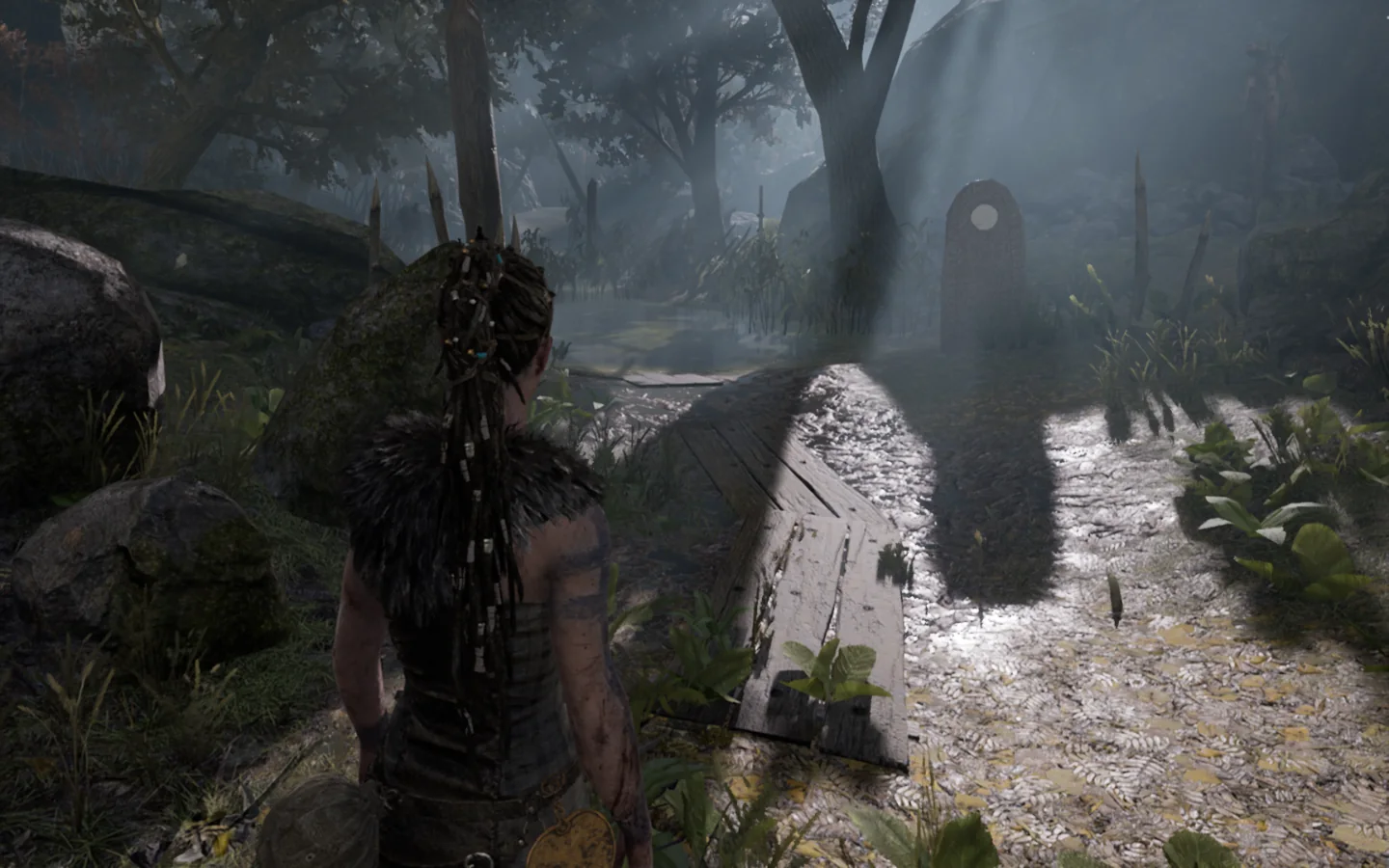
Left eye view of the same game frame, rendered by the stereo layer
Left eye
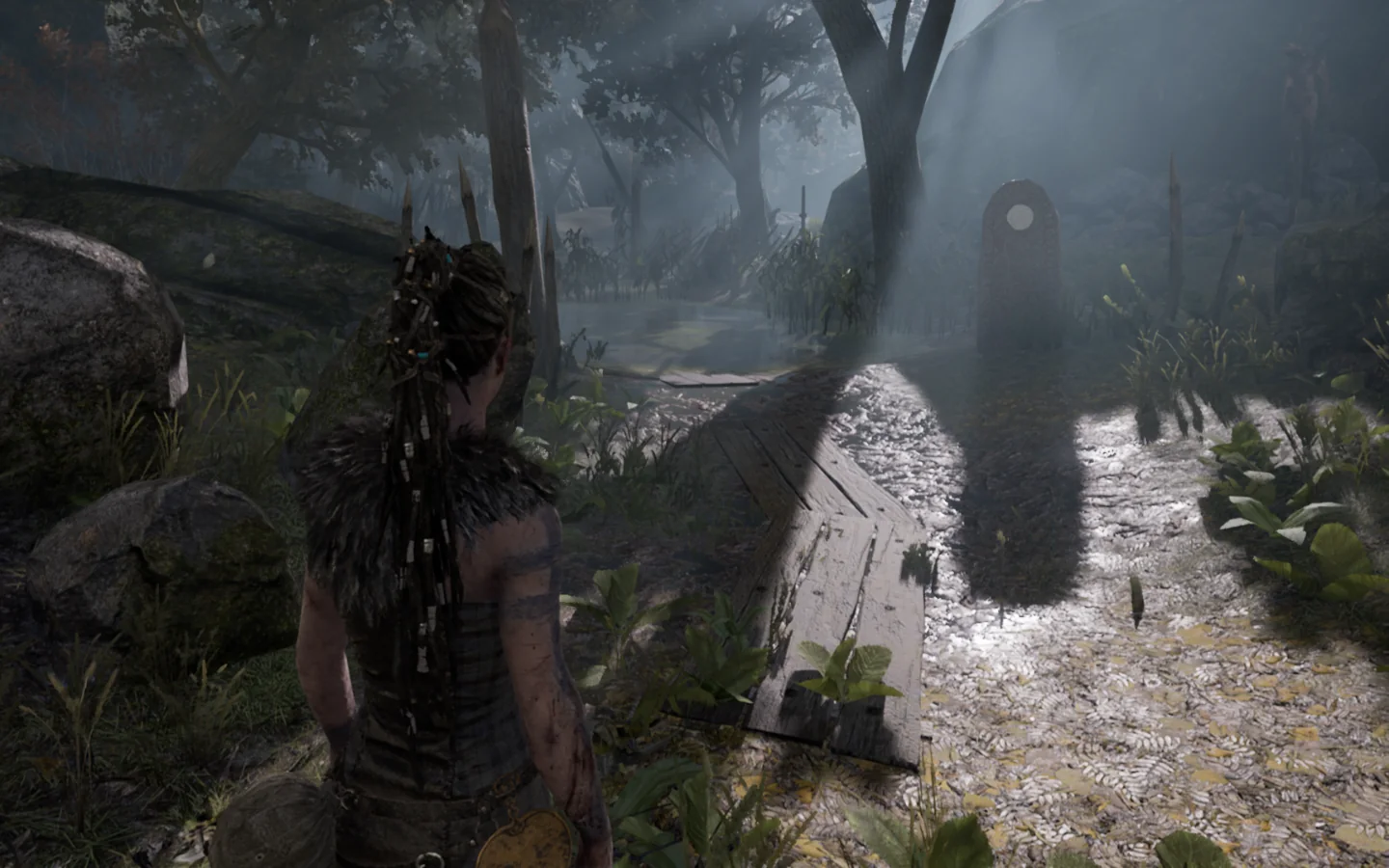
Right eye view of the same game frame, rendered by the stereo layer
Right eye

One frame of a UE4 title, rendered twice by the stereo layer on Steam for Linux and woven by the runtime for your display.

Pick your system

One program, three ways in.

The same stereo engine renders your game from two eye positions on every system. What differs is how it reaches you.

Play for Steam

Preview

A Steam compatibility tool named “DisplayXR 3D”. Pick it in a game’s properties and the game starts in 3D; a detector chooses the route per title.

  1. Install DisplayXR for Linux.
  2. Install the compatibility tool.
  3. Game › Properties › Compatibility › DisplayXR 3D.

Desktop mode today. Gaming Mode depends on the compositor presenting pixel-exact.

Play for Windows

Preview

An installer places the stereo D3D11 or D3D12 layer next to each game and writes its profile. Unreal titles can also go through their VR mod, which speaks OpenXR to DisplayXR directly.

  1. Install DisplayXR for Windows.
  2. Run the Play installer, pick your games.
  3. Launch from your store as usual.

Already using a ReShade side-by-side setup? Its DisplayXR backend is in review upstream.

Play for Android

Available · v0.6.4

Native games get an in-process mod loaded by a community launcher; PC games run in a Wine container with the stereo layer inside. A small companion app holds the camera grant and brokers the weave.

  1. Install DisplayXR for Android and the companion app.
  2. Install the launcher and drop in the mod folder.
  3. Companion app: Turn 3D On. Launcher: Launch.

First game: Minecraft Bedrock.

How it works

Two eyes from one game, then one hand-off.

Nothing in the middle depends on the operating system except the last step. The stereo producer is a fork of the open Direct3D-to-Vulkan layers; games that never touch Direct3D get an in-process mod; VR mods already speak OpenXR.

  1. 01

    Your game

    D3D11 and D3D12 titles from any store. Native Android games. Unreal and Unity titles with VR mods.

  2. 02

    Stereo producer

    Every geometry pass rendered from two eye positions; screen-space effects carried per eye. Not a depth reprojection.

  3. 03

    Hand-off

    An OpenXR session on the game’s own device, a side-by-side bridge, or the companion app on Android.

  4. 04

    DisplayXR runtime

    Tracked eyes, off-axis views, late weave at display rate, automatic 2D on flat menus.

  5. 05

    Your display

    The display’s own plug-in weaves the pair, pixel-exact. Any vendor that ships a plug-in.

For display makers

Ship one plug-in. Get every game.

Play never weaves or tracks. Your display's plug-in does, once, through the DisplayXR runtime, and the same plug-in serves the Browser, the demos and every OpenXR app. There is no per-title work on your side and nothing to re-test when a game updates.

You ship

The display plug-in

One plug-in for your display processor: weave, tracking, geometry. The same plug-in that serves every DisplayXR app. No per-title work, no game SDK, nothing to re-test when a game updates.

DisplayXR runtime

Tracked views and the weave call

Takes the two eyes from the game, applies the tracked eye positions and off-axis projection, calls your plug-in at display rate, and drops to 2D on flat menus.

Play

The games

Stereo layers, detector, per-game profiles and installers, maintained in the open. A title verified on one display plays on every display with a plug-in.

Where it stands

  1. Now

    Android lane available: the native mod core, the first game's mod, the companion app.

  2. December 12, 2026

    Public PC release: the Steam compatibility tool for Linux, the Windows installer, the stereo D3D11 and D3D12 layers, and profiles for the titles of the December run.

  3. 2027

    More engines, more routes, more games. Each milestone gets a date here once it is scheduled.

Bringing a display

The vendor onboarding guide walks through the plug-in interface and the test scenes; the Components page lists what already ships with DisplayXR. Display and PC makers who want to run Play on a panel before the December release: start a thread in Discussions and we take it from there.

What plays today

What plays, and how.

Every row is a game a person played in stereo on a 3D display. A title is named only once a release carries it. Games with anti-cheat or that need a headset are refused by the detector and listed as such.

Legend:PlaysPartialRefused
GameSystemRouteStatusNotes
Minecraft Bedrock 1.26Download mod 0.6.4AndroidNative mod via launcherPlaysShadows, fog, sky, hand and HUD correct in both eyes.
Unreal 4 action title (named at release)Steam on Linux · WindowsD3D11 stereo layer, in-process XRPlays (preview)D3D12 also works.
Unity 2019 exploration title (named at release)Steam on LinuxD3D11 stereo layerPartialClean on D3D11. The D3D12 route breaks geometry on this engine version; the detector routes around it.
VR-only edition of the Unreal title (named at release)Steam on LinuxnoneRefusedNeeds a headset; the detector reads the store flag and turns 3D off.
Report a gameShare a profile

Ten more titles are in the December run. Player reports go into the same table, marked as community-verified.

You stay in control

Three dials. Auto by default, yours on demand.

Every game gets the same three controls, in the same overlay, on every system. The defaults come from the per-game profile; anything you change is saved back into it and can be shared.

F1

Depth

How far apart the two eyes are, as a percentage of your real eye distance. 100 % is life-size; most people settle between 60 and 120.

F2

Screen distance

What sits at the glass. Auto follows the scene: the camera is converged, never the picture shifted, so edges stay put and the HUD stays on screen. Switch to manual to pin it.

F3

3D on or off

Flat menus and cutscenes drop to 2D on their own. One key forces 2D when you want it, or brings 3D back.

profiles/414340.tomlper-game profile, shared on GitHub
# store app id, never a trademark
[game]
route        = "d3d11"        # d3d11 | d3d12 | ue-mod | native
render_scale = 0.5            # engine render scale for this title

[stereo]
depth        = 100            # % of eye distance, F1 in game
convergence  = "auto"         # auto | <meters>, F2 in game
auto_2d      = true           # flat menus and cutscenes

[passes]
ssr          = "layer-select" # fixes the reflection pass per eye

Power users edit the pass section; everyone else never sees it. A submitted profile is reviewed and lands in the table above as community-verified.

The rules

Four things we will not do.

No depth tricks

Two rendered views or nothing. No reprojection from a depth buffer, no SteamVR in the chain.

No anti-cheat games

Single-player titles only. The detector refuses the rest so you never risk an account.

No game assets or code

You own the game and install it from its store. Play only hooks the graphics API inside the process.

No vendor lock

Play talks to the DisplayXR runtime only. Any display with a plug-in gets the same games.

Build with us

Port a game, submit a profile, fix a pass.

The porting guide explains the method behind every rule, with the measurements. Profiles are plain text keyed by store app id. The stereo layers are maintained forks of open projects.

displayxr-play-androidNative mod core, the first game’s mod, the companion appv0.6.4
displayxr-playCompatibility tool, detector, bridge, profiles, Windows installerDecember
displayxr-dxvk · displayxr-vkd3d-protonThe stereo D3D11 and D3D12 layersDecember

Questions

What people ask before they install.

Players

Is my DirectX game now running on Vulkan?

Yes. The stereo layer is a fork of DXVK and vkd3d-proton, the open-source layers that implement Direct3D 11 and 12 on top of Vulkan and that Proton uses on Linux. On Windows the installer puts the layer's DLLs next to the game's executable; the game keeps calling Direct3D and the layer runs it through your GPU's Vulkan driver. That is where the second eye is rendered, and it is why the same layer works on Windows, on Linux and inside the Android container.

Why a Direct3D-on-Vulkan layer instead of hooking Direct3D like the old 3D injectors?

Because the layer sees everything the game submits: every draw, render target, constant buffer and depth buffer. It renders each geometry pass once per eye, gives each eye its own camera so anti-aliasing, motion vectors, reflections and lighting match, reads the depth buffer to set the screen distance, and opens the OpenXR session to the DisplayXR runtime on the same GPU device. What is left per game is a small text profile, not hand-written shader fixes.

Is this like the depth-based 3D shaders?

No. Those guess a second view from one picture and a depth buffer. Play renders the second view. Objects have real sides, reflections and shadows match per eye, and nothing smears at edges.

What does the installer put in my game folder, and how do I remove it?

A few DLLs with Direct3D's file names, a configuration file and the game's profile. Nothing in the game's own files changes. Remove the game from the Play installer, or delete those files, and the game is back to stock; a store's file verification leaves them alone because they are extra files, not modified ones.

Will it get me banned?

Play is for single-player titles. Before a game starts, the detector looks for anti-cheat components and turns 3D off if it finds any, so the layer is never loaded into a protected process. A game with an online mode but no anti-cheat starts normally; Play changes nothing in the game's data or memory, only how its frames are rendered.

Saves, achievements, cloud sync and the store overlay?

Saves, achievements and cloud sync are untouched; they never go through the graphics API. Turn the store's in-game overlay off for now: it draws into the frame before the weave and shows doubled. Overlays across the weave are an open item.

Does a game that is not in the table work?

Usually the detector can route it: Direct3D 11 and 12 titles get the stereo layer with default settings, Unreal titles can take the VR-mod route, and anything on another graphics API or with anti-cheat is turned off. Whether the result looks right is what the table records, so try it and report; a report with a captured eye pair becomes a community-verified row.

Does 3D break when the game updates?

Rarely. The layer carries no per-game shader fixes that a patch could break; what it recognizes is the engine's camera data, which changes with engine versions, not game patches. Your profile keeps its depth and screen-distance settings across updates. A new engine version can need a new recognition rule, which lands in the layer once for every game on that engine.

Can I turn it off or down while playing?

Yes. One key switches between 3D and 2D without leaving the game; another sets depth as a percentage of your eye distance. Depth is capped by a comfort zone by default, so the scene never asks your eyes for more than a desk-distance display is comfortable with, and flat menus and cutscenes drop to 2D on their own. The controls are keyboard keys in the preview; a controller binding is not built yet.

Do DLSS, FSR, frame generation, ray tracing and HDR work?

Each eye gets its own camera, which is what temporal upscalers need, but none of them has been verified in stereo yet. Ray tracing is off by default on the Direct3D 12 route, and HDR output is not part of the preview. Report what you see and it goes in the table for that title.

Which stores?

Any store that installs the game as plain files: Steam, Epic, GOG and the like. Games installed by the Xbox app into its protected folders cannot take a file next to the executable, so they are not supported today.

Does it work with my ReShade setup?

Yes on Windows once the DisplayXR backend of the side-by-side add-on is merged upstream: your existing side-by-side source then weaves through DisplayXR. For real stereo, use the Play installer.

Which displays?

Any display with a DisplayXR plug-in, with or without glasses. The DisplayXR runtime and the display plug-in come from the Download page; Play adds the games on top.

What is the preview today, and is it free?

Nothing to download on PC yet: the public PC release is December 12, 2026. Until then, the preview is the Discussions thread where people running it on panels report results. Everything is free and open source; the Android lane is downloadable now.
Linux and Steam Deck

What does the DisplayXR 3D compatibility tool do that plain Proton does not?

It is a thin wrapper over Proton. It launches the game through Steam's own Proton Experimental inside the Steam Linux Runtime container, with Play's stereo DXVK and vkd3d-proton in place of Proton's own, runs the detector first to pick the route for that title, and opens the DisplayXR session from inside the container. It replaces the Proton version you had selected for that game.

Why desktop mode only on the Deck?

The woven image has to reach the panel pixel for pixel. Gaming Mode's compositor scales and filters what it presents, which destroys the weave. Desktop mode presents exactly, so Play works there today; Gaming Mode is an open item.

AMD, Intel or NVIDIA?

The layer is standard Vulkan and runs wherever DXVK and vkd3d-proton run. The preview was measured on an Intel integrated GPU; a handheld-class AMD box is the December target; NVIDIA on Linux is untested.

Do the forks track upstream?

Yes. The stereo work sits on top of the upstream layers, and upstream changes are pulled in as they land. Upstream DXVK declined a stereo mode, so the stereo code stays a maintained fork rather than a patch set waiting to be merged.

The detector refuses VR games. What about games that are flat and VR in one app?

Those are fine. The detector reads the store's VR-only flag, not VR-supported. A game that ships flat and VR in one app starts flat and takes the normal route.

How do I make and share a profile?

Change the three controls in the game; they are saved into the game's profile, a plain-text file keyed by the store app id. Post it in Discussions today; once the profiles repository is public, open a pull request. A profile needs a captured eye pair or a person's report to be marked community-verified.

Display makers

Which licenses, and may we bundle it?

The DisplayXR runtime and the Android lane are under the Boost Software License 1.0. The stereo layers keep their upstream licenses: zlib for the Direct3D 11 layer and LGPL-2.1 for the Direct3D 12 layer. All of them permit bundling and preinstallation; the LGPL layer ships with its source offer.

Who maintains the stereo layers, and what if the project stops?

The DisplayXR project maintains them in the open, as it does the runtime. Everything is open source under permissive licenses, so a display maker can carry them on without asking anyone.

How is a title verified, and can we curate our own list?

A title is verified when a person has played it in stereo on a 3D display and the result is recorded with a captured eye pair; community reports are marked as such. A display maker can ship its own default profiles and its own list with a device; the project's table stays the shared one, and a title verified on one display plays on every display with a plug-in.

What does it cost?

Nothing. The software is free and open source, and the project has no membership or fee.

Game developers

What does the layer do to my renderer?

It implements Direct3D 11 or 12 on Vulkan, so it sees every call your game makes. It recognizes the engine's per-view constant buffer by its contents and binds a copy per eye with that eye's camera, so anti-aliasing, motion vectors, screen-space reflections, deferred lighting and shadow lookups see the right view. Geometry passes replay once per eye; passes that do not depend on the camera run once.

Which effects break, and who fixes them?

The known case is a screen-space pass that samples a stereo texture inside a geometry pass, such as some reflection and refraction setups; the profile can select the right layer for that pass. An engine family without a camera-recognition rule gets correct geometry but may get camera-dependent shading wrong; adding the rule is layer work, done once per engine, by the project or a contributor.

Can I opt in natively, or opt out?

Both. A game that opens its own OpenXR session with the DisplayXR extensions, through the Unity or Unreal plug-in or directly, renders its own stereo and does not need the layer; tell the project and the title's profile routes around it. A developer who does not want the layer in their game asks in Discussions and the title's profile is set to off.

Will you name my game?

Only once a public release carries it, and only to say that the release supports it. Profiles are keyed by store app id, never by the game's name. A developer who prefers not to be listed by name asks, and the row goes by app id.

How do I tell a Play problem from my own bug?

The layer writes its own logs next to the game's executable, named after it with a d3d11, dxgi or d3d12 suffix. If those files exist, the game ran under Play, and a crash report with them belongs in Play's tracker, not yours.

The project

Is this one display company's project?

No. DisplayXR is a vendor-neutral open-source project; display makers take part by shipping a plug-in, and no vendor has a privileged code path. The first shipping plug-in targets one vendor's displays, which is why that vendor is the only one on the platform-support page today.

Why no titles and no performance numbers on the page?

Titles are named only once a public release carries them, so the page never claims a compatibility a release does not deliver. Performance depends on the game, the GPU and the render scale, so it is recorded per title in the compatibility table rather than quoted as a headline.

Why do some repositories say December?

The PC side runs on the maintainers' machines and goes public with the December 12, 2026 release, when its profiles and layers can be used without hand-holding. The Android lane is public today.

Game names appear here only to say which game a release supports. A question that is not here goes to Discussions.