About DisplayXR
An open-source OpenXR runtime and the extensions OpenXR needs for spatial displays: one way to build spatial content for every display, from every vendor.
What is a spatial display?
A spatial display gives you a volumetric experience of what it shows. Content is perceived, and felt, in 3D space, in front of and behind the screen, instead of lying on a flat 2D plane.
The family is broad:
- Glasses-free displays: tracked stereo, which follows your eyes, and light-field or multiview panels.
- Stereo displays you wear glasses for.
- And, by extension, headsets.
DisplayXR is for all of them, with or without glasses.
Headsets and spatial displays
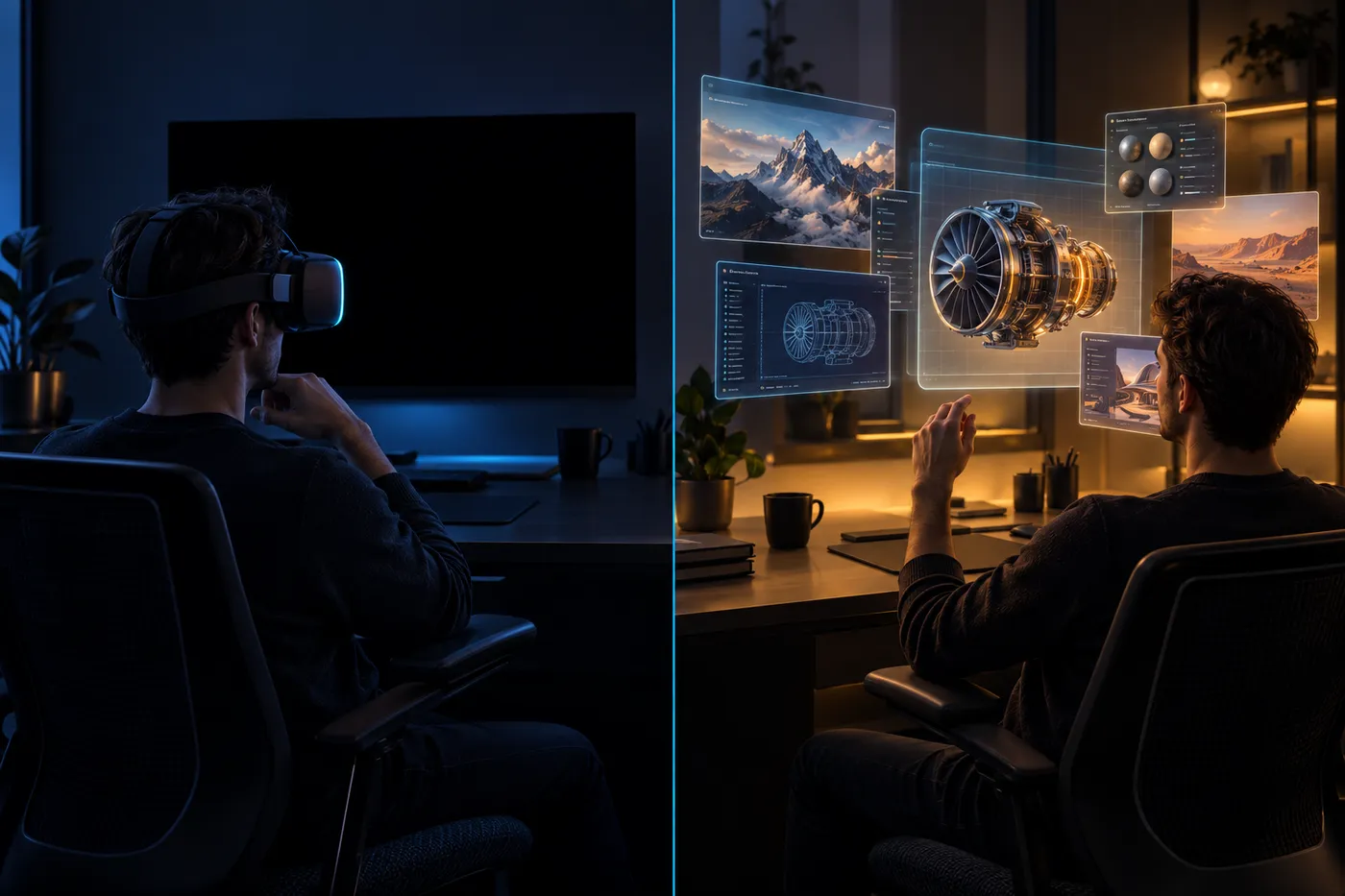
Both show spatial content to two eyes in real time, and both track the viewer. The difference is the device. A headset is worn and runs one exclusive session that owns everything you see. A spatial display sits on a desk, is a screen with a physical size and location, and shares that screen with ordinary 2D windows.
What they have in common is the content, and the contract an app uses to show it: OpenXR, the Khronos standard for XR applications.
Where OpenXR needs extending
OpenXR was written for headsets, so a few things a display needs have no words in it yet. DisplayXR adds them as XR_DXR_* extensions, under an author ID registered with Khronos, on top of an open-source OpenXR runtime that runs the official Khronos conformance suite. It builds on OpenXR; it is not a separate standard. Four examples:
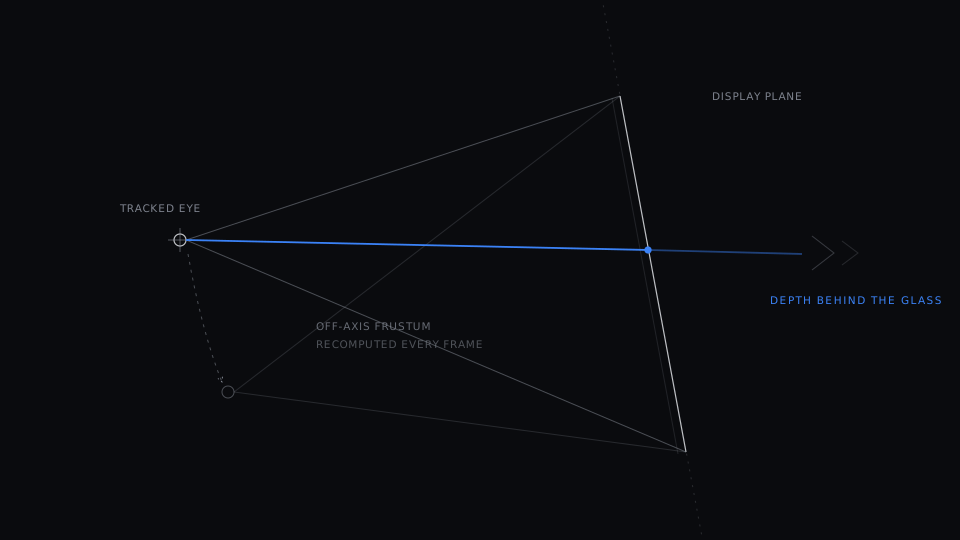
Where the display is
OpenXR assumes a headset: A headset moves with your head, so OpenXR hands the app a symmetric field of view.
On a display: A display has a physical size and stays put, and both eyes look at the same rectangle from different places.
DisplayXR adds: The panel's size and position in metres, the tracked eye positions and the rendering modes, so each eye gets the right off-axis view. A 10 cm cube renders 10 cm.
XR_DXR_display_info · XR_DXR_view_rig
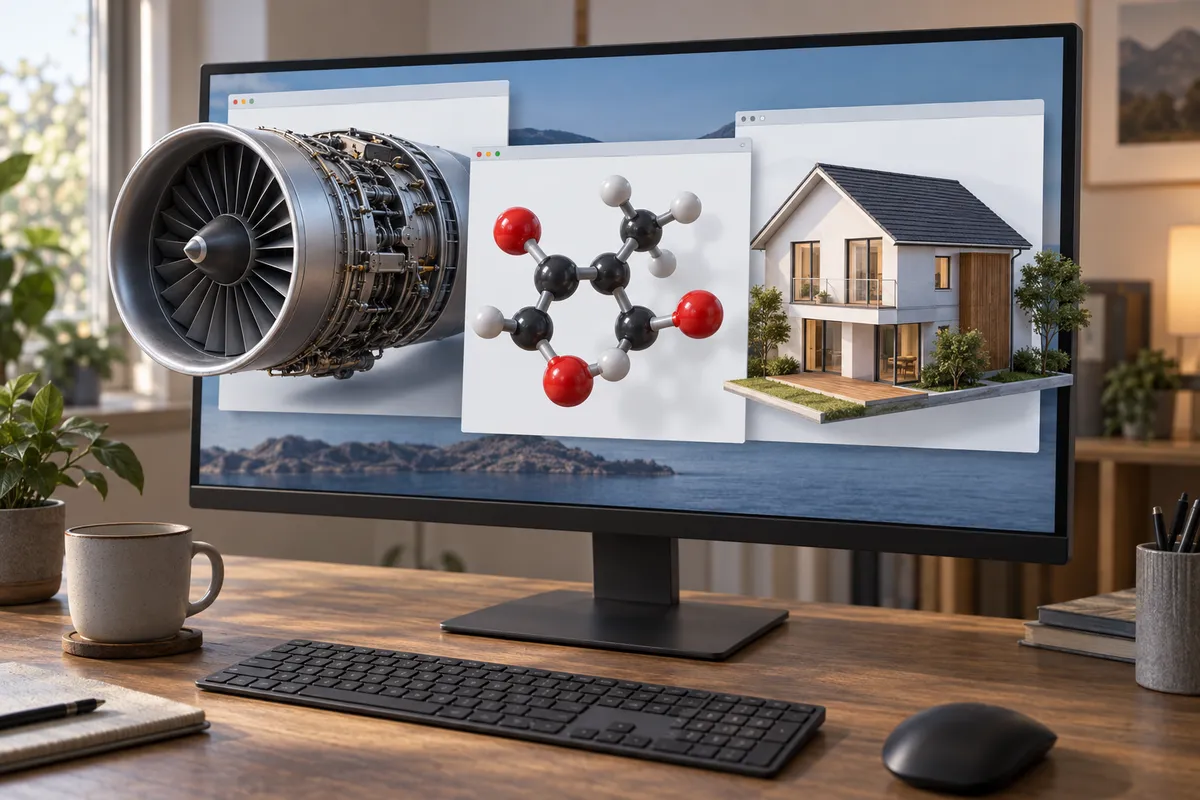
Many windows, not one screen
OpenXR assumes a headset: A headset session is exclusive: it owns the whole display, because on a headset that is the whole world.
On a display: On a desk, several 3D apps share the screen in ordinary windows you drag, resize and overlap.
DisplayXR adds: Window binding: the app hands the runtime its own window, and each window keeps its 3D while it moves.
XR_DXR_win32_window_binding · XR_DXR_cocoa_window_binding · XR_DXR_xlib_window_binding · XR_DXR_wayland_surface_binding · XR_DXR_android_surface_binding

2D and 3D in the same window
OpenXR assumes a headset: Core OpenXR's layers (projection, quad, cube, cylinder) describe a world, not a 3D region inside a 2D window.
On a display: Most of a screen is text and menus. The 3D is one region inside the window, with the flat page around it.
DisplayXR adds: 2D/3D zones: 3D inside, a flat page around it. This is the same capability a 3D object inside a web page uses.
XR_DXR_display_zones · XR_DXR_local_3d_zone · XR_DXR_weave

3D over the desktop, when you want it
OpenXR assumes a headset: In a headset there is no desktop: one compositor draws everything the eyes see.
On a display: On a desk, 3D can sit over ordinary flat windows, see-through around its edges, with clicks passing to the window behind.
DisplayXR adds: Transparent presentation and a depth budget, so 3D content can live on top of the desktop without taking it over.
XR_DXR_depth_budget · XR_DXR_spatial_workspace
Why it is modular
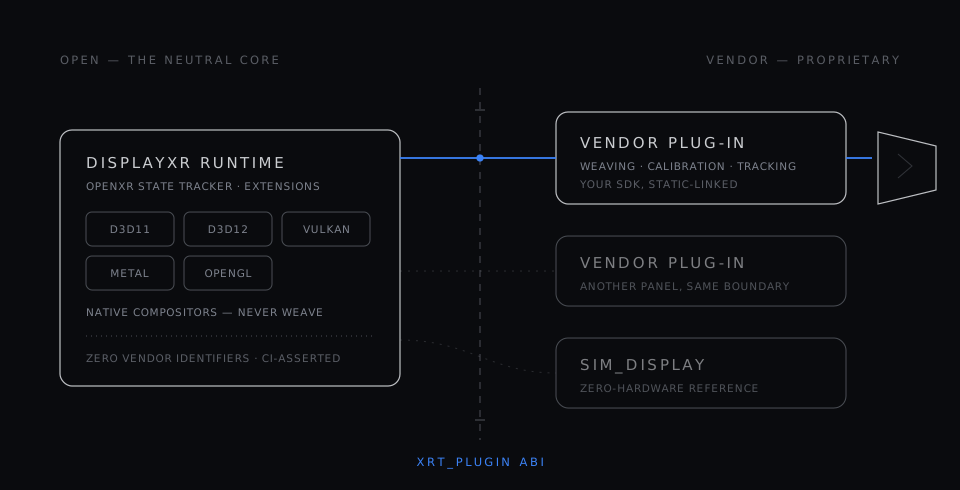
Displays differ, and they should: the optics, the eye tracking and the calibration are what each display maker does best. So DisplayXR draws one line. Apps talk only to OpenXR and the extensions. Each display maker ships a display plug-in that does the display-specific work, and tracking hardware plugs in the same way through a separate input-provider plug-in.
Apps never touch a vendor, and vendors never touch an app. The runtime itself carries no vendor code, and its build checks that. An app written once runs on every display that has a plug-in, and a new display runs every app that already exists.
Why the web matters
Most spatial content will not be an installed app. It will be a product on a shopping page, a movie, a photo, a call. The DisplayXR Browser and its SDK let anyone make and share that content with a few lines of JavaScript and a URL, and the same page stays an ordinary page on every other screen.
The direction: one framework
Today a headset and a spatial display are different device classes with a common contract. Where this is heading is one framework for spatial content on both: the same content and the same API, whether you wear the display or put it on your desk. That is why DisplayXR extends OpenXR rather than standing apart from it.
Open, neutral, and how to reach us
The runtime, the extensions, the engine plug-ins and the demos are open source. DisplayXR is vendor-neutral: any display maker can write a plug-in, free of charge and without permission. How decisions are made is on the governance page.
Questions and ideas: GitHub Discussions. Partners and press: partners@displayxr.org.
The Ecosystem
More than a runtime
DisplayXR is developing as a full ecosystem — runtime, extensions, engine plugins, projection math, demos, and reference workspace controllers.
See it running
The DisplayXR Gallery is a live gallery of 3D photography: a curated set of stereo captures, woven natively in the DisplayXR Browser and degrading to a cursor-driven parallax preview in any other browser. It doubles as the reference for how an inline-3D page should behave — the same page serves both, with no separate 3D build.
Every photo carries per-eye depth, so a Depth view can turn any shot into its own depth map. On a 3D display that view stays dimensional rather than flattening into a picture of a depth map — which is the difference the format is for.
Core
displayxr-runtime
ShippingCore OpenXR runtime with native compositors for D3D11, D3D12, Vulkan, Metal, and OpenGL — on Windows, macOS, and Android, plus a Vulkan-only compositor on desktop Linux, native on Wayland (shipping as .deb packages).
displayxr-extensions
ShippingOpenXR extension specs and headers for spatial display capabilities.
Engine Plugins
displayxr-unity
ShippingUnity engine plugin (UPM package) with eye-tracked stereo rendering, sample scenes, and standalone editor preview.
displayxr-unity-samples
ShippingReady-to-open Unity sample projects — Built-in/URP/HDRP pipeline tests plus a transparent Desktop Avatar showcase — wired to the DisplayXR Unity plugin, with one shared installer. Consolidates the earlier per-feature test repos into a single monorepo.
displayxr-unreal
ShippingUnreal Engine plugin (UE 5.7) with eye-tracked Kooima stereo, camera- and display-centric rigs, Blueprint components, material expression nodes, and zero-copy atlas handoff. Windows, macOS, Android.
displayxr-unreal-test
ActiveUnreal test project for the DisplayXR plugin — a sample scene and setup, pinned to a plugin release, used to validate the plugin against new runtime and engine releases.
Libraries
displayxr-common
ShippingShared math and common library — off-axis (Kooima) projection, atlas tiling, and window/canvas helpers — including one Linux app window that picks native Wayland or X11 by capability probe, with shared client-side window chrome — consumed by the runtime, engine plugins, and demos from a single source of truth.
displayxr-mcp
ShippingTiny embeddable Model Context Protocol server framework, plus the DisplayXR MCP Tools installer that end users download to opt in to AI-agent / voice control. The framework lets the runtime, the reference shell, and any third-party workspace controller expose live spatial state and control to AI agents (Claude Code, voice CLIs, custom drivers); the installer writes a registry capability flag the runtime and shell read at startup.
displayxr-vendor-template
EarlyVendor-neutral starter kit for building a DisplayXR display-processor plug-in — the ABI, discovery, and build scaffolding a new 3D-display maker needs, with no vendor SDK required. Fork it to bring up a plug-in against the sim_display path, then swap in your own weaver.
displayxr-cef-host
ExperimentalThe original proof that XR_DXR_weave works — not a browser to use, which is DisplayXR Browser. A small CEF (Chromium Embedded Framework) offscreen-render app that hands the runtime a stereo texture and a window rect and composites the weaved result; it never weaves itself. Kept as the smallest worked example of driving the weave from your own present-owner without forking Chromium, and because it builds in minutes where the browser fork takes hours. It is pinned to the first revision of the weave spec, far behind the runtime's current one, so it does not exercise batched submit, the 2D overlay atlas, N-view input, the Android handle kinds, or IPC brokering — treat it as a starting point to read, not a current conformance harness.
displayxr-web
ShippingThe inline-3D JavaScript SDK, published on npm as @displayxr/inline3d — 3D photos, video, models, Gaussian splats, a 3D media player and 3D video calls in a few lines — plus its live samples on GitHub Pages, which double as the DisplayXR Browser's start page. Every page renders as ordinary 2D in other browsers.
displayxr-models
ActiveContent-addressed ONNX depth and inpainting models behind the DisplayXR Browser's Convert to 3D — permissively licensed only, published as permanent release blobs.
Demo Applications
displayxr-demo-gaussiansplat
ShippingReal-time 3D Gaussian Splatting viewer (.spz / .ply) for spatial displays. Windows, macOS, Linux, Android.
displayxr-demo-modelviewer
Shipping3D glTF 2.0 PBR model viewer (OpenXR + Vulkan). Drag-and-drop a .glb / .gltf model. Windows, macOS, Linux, Android.
displayxr-demo-mediaplayer
ShippingSpatial media player — stereo photos, GPU-decoded video with synchronized audio, and folder slideshows, with playback controllable by AI agents. Windows, macOS, Linux, Android.
displayxr-demo-avatar
ShippingA transparent, click-through 3D avatar that floats over your desktop (OpenXR + native Vulkan) — weaved in 3D with a flat 2D speech bubble beside it, and clicks passing through to whatever is behind. Showcases the see-through transparency and mixed 2D/3D display-zone path, now with live desktop content composited under the weave on all four platforms.
displayxr-demo-earthview
BetaStreaming 3D city viewer on Google Photorealistic 3D Tiles (OpenXR + Vulkan). Fly the full-scale world camera-style, or double-click to frame a neighborhood as a tabletop diorama. Requires a Google Map Tiles API key.
displayxr-reference-scenes
ShippingReference scenes for showing and validating open-standard 3D content — OpenUSD, MaterialX/OpenPBR and glTF — on spatial displays.
Workspace Controllers
displayxr-shell-releases
ShippingReference spatial workspace controller — a 3D window manager with multi-app compositing, 2D window capture, dynamic layouts, and focus-adaptive rendering. Windows, with a macOS build in beta. Ships as a standalone installer; build your own controller for verticals, kiosks, or OEM-branded workspaces using the same extension surface.
displayxr-browser
ShippingDisplayXR Browser — a Chromium that renders the web normally and weaves inline 3D on DisplayXR hardware, on Windows, Android and Linux, with macOS coming soon. The productization of the inline-3D browser work validated by the CEF host, with a GPU-resident weave (no per-frame CPU readback). Security updates follow Chrome stable: every Chrome stable point release is rebuilt and published automatically when the browser's own code is untouched upstream, and verified on a DisplayXR display first when it is not. Pinned in the org version matrix as `browser`, and installable via the dev orchestrator with `--with browser`; it is deliberately not in the all-in-one bundle, because a full standalone browser is not part of the display stack the default install lays down.