Architecture
How the DisplayXR stack works, from OpenXR API layer through native compositors to vendor display processors.
Stack Overview
DisplayXR sits between the OpenXR API and vendor-specific display hardware. Applications write to the standard OpenXR interface. DisplayXR handles session management, compositor orchestration, and extension dispatch. Vendor-specific processing — weaving, interlacing, calibration — happens below, in the display processor layer. The same runtime ships on Windows, macOS, Android, and desktop Linux.
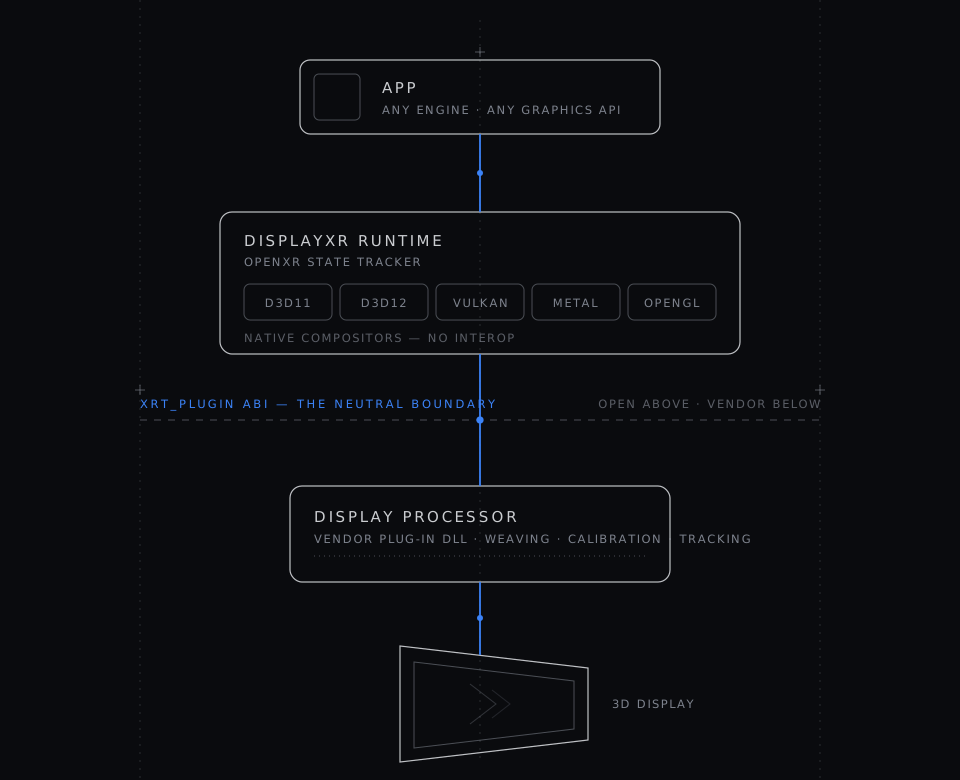
Each graphics API gets its own native compositor. No cross-API interop or Vulkan intermediary is required.
Native Compositor Model
Most XR runtimes use a single graphics API internally and translate submitted textures as needed. DisplayXR takes a different approach: each supported graphics API has its own dedicated compositor implementation.
Platforms
DisplayXR runs on four platforms from one codebase. On Windows it drives LeiaSR displays through the D3D11/D3D12/Vulkan/OpenGL compositors; on macOS it ships the Metal, OpenGL, and MoltenVK paths against the simulation backend.
On Android, the same OpenXR runtime drives integrated 3D tablets and handhelds — such as ZTE's Nubia Pad 2 and Red Magic Explorer 3D — through the native Vulkan compositor. The vendor display processor runs out-of-process as a service, so the runtime stays vendor-neutral and apps connect over IPC with a zero-copy buffer handoff. Rendering is orientation-aware — portrait and landscape share one worst-case atlas, with no stall on live rotation — and the same display-zone and see-through transparency model used on the desktop lets a weaved 3D object sit beside a flat 2D HUD or float over the live screen.
Desktop Linux ships, and its primary target is native Wayland: glasses-free 3D windows run as native Wayland apps on Ubuntu 24.04 and 26.04 with GNOME. One native Vulkan compositor presents into the app's own surface, handed over through XR_DXR_wayland_surface_binding. Wayland never tells a client where its window is, so a small GNOME Shell extension shipped with the runtime publishes window geometry to it and keeps every step of a drag on the lens's phase lattice, at any output scale; the window's translucent title bar lives on its own surface, above the 3D content and outside the weave, and an opaque window declares an opaque surface so the desktop compositor can scan a fullscreen weave out directly. Transparent overlays work the same way they do elsewhere: a per-pixel-transparent 3D object stands on the desktop with live screen content composited under the weave — captured with the app's own window excluded, and only while its content is actually transparent. Apps ship one binary that picks native Wayland automatically; X11 and XWayland remain supported as the legacy path through XR_DXR_xlib_window_binding, weaving only when the panel is addressed 1:1 at an integer scale. Every component — runtime, vendor plug-in, and all five demos — ships as a .deb built on the oldest supported Ubuntu release, and the bundle installs the whole stack in one command with no environment variables to set. Ubuntu 22.04 is supported with an X11 session recommended, but is not yet hardware-validated.
One Model for 2D and 3D Regions
A spatial-display window is rarely all-3D. A weaved 3D object often needs to sit beside a flat 2D HUD, a toolbar, or live screen content. DisplayXR expresses every such layout through a single mechanism — XR_DXR_display_zones: an app declares any number of 3D zones (each a rectangle with its own view rig and swapchain) alongside any number of 2D zones, plus a per-pixel wish mask that tells the panel which areas should be physically 3D and which should stay flat. There is now exactly one way to say "this region is 3D, that region is 2D."
This replaces an earlier, narrower mechanism. The original 2D-surround / output-rect path could only express a single 3D rectangle surrounded by one monolithic 2D fill — a strict special case of the zone model, where the output rect is just one 3D zone and the surround one 2D zone. It was retired in runtime v1.25.0, folding both 2D and 3D region expression onto the same compositing path and removing the redundant per-API fill code.
Crucially, how an app owns its output surface is orthogonal to how it expresses regions. Whether the app draws into its own window, shares a texture with the runtime, or lets the runtime host a window for it, zones are how all of them carve up 2D and 3D. A plain full-window app is simply the degenerate one-zone case — it needs no explicit zones at all.
Compositing on a Woven Surface
A woven window is not an ordinary element. The runtime reads its composited quad every frame and interleaves the two eyes into the display’s view pattern. That has a consequence authors meet immediately: what you draw on top of a 3D window is not automatically 2D.
Put a caption, a badge, or a hover plate over a woven window and — unaided — it is woven along with the content, arriving interleaved instead of crisp. DisplayXR handles the common case with overlay exclusion: mark the element and the compositor punches a per-pixel 2D hole in the weave there, compositing it over the woven 3D. The plate stays sharp, and a translucent scrim still reveals the depth underneath it.
Exclusion is for partial regions, not whole windows. The compositor identifies a window by its rect. An overlay covering the entire window shares that rect, the match becomes ambiguous, and the window falls back to presenting its raw side-by-side buffer. So a full-surface effect — a depth view, a colour grade, a transition — cannot be layered on top. This is a property of matching by rect, not a gap to be patched.
Partial overlay — use exclusion
Caption bands, badges, hover plates, floating toolbars — anything occupying a sub-region of the window. Marked elements composite as crisp 2D over the woven 3D.
Full-surface effect — swap the source
Depth views, colour grades, transitions — anything edge to edge. Redraw the buffer the window is woven from. Same weave, real stereo depth, no extra layer.
The pattern that does work is to change what gets woven instead of drawing over it. A window’s source is a buffer the runtime repaints from every frame: swap or redraw that buffer and the effect travels through the same weave. It keeps real stereo depth, costs no additional compositing layer, and there is nothing left to collide.
Progressive enhancement is a requirement here, not a slogan: an inline-3D page has to be a first-class page on an ordinary monitor. Where the runtime is absent, the same content renders from the stereo pair and its per-eye depth, synthesizing an in-between viewpoint that tracks the cursor — so the depth stays legible as motion parallax instead of being discarded. The 3D display makes the depth literal; the fallback keeps it visible. One page, one codebase, no separate “3D version”.
Shipping Components
A DisplayXR install delivers four cooperating pieces. Most applications only interact with the first; the others come into play when apps are sandboxed, when the shell is running, or when the web is the target surface.
How the Pieces Ship
DisplayXR is deliberately split across repositories so each piece evolves on its own cadence and the runtime stays vendor-neutral — the runtime binary carries no vendor SDK and no shell code. You can install everything at once with the meta-installer, or add components individually.
.pkg.Workspace Controllers
The runtime is useful on its own. A bare install gives you a standards-compliant OpenXR + WebXR surface for a 3D display — full-screen apps, simulation backend, native compositors. No spatial desktop, no windowing, no launcher.
A workspace controller is an optional process that adds spatial-desktop features on top: multi-app composition, window chrome, layout presets, an app launcher. The runtime exposes one extension for this: XR_DXR_spatial_workspace for window pose / hit-test / capture; launcher tiles come from each app's *.displayxr.json manifest. Anything that speaks it is a first-class controller.
Reference: DisplayXR Shell
Distributed separately as a polished, opinionated spatial desktop — 3D window manager, 2D capture, focus-adaptive 2D/3D mode, layout presets, launcher, MCP control. Optional.
Build your own
OEM-branded workspace, vertical cockpit (CAD, medical, automotive HMI), kiosk, or AI-agent driver. Implement the two extensions, register your binary, and the runtime treats it the same as the reference shell.
Activation is gated by orchestrator-PID match: the runtime trusts the binary it was configured to spawn, not a brand string. OEMs point a single service.json field at whichever controller the SKU should run.
Spec details: workspace-controller-registration.md.
AI Control Surface
DisplayXR exposes live spatial state and control to AI agents over the Model Context Protocol. The framework is a separate, embeddable library at displayxr-mcp — JSON-RPC 2.0 over a unix-socket / Windows-named-pipe transport, with a stdio bridge for any MCP client (Claude Code, voice CLI, custom agent).
Runtime tools (Phase A)
Per-PID server inside each app's runtime DLL. Introspection: list_sessions, get_display_info, get_kooima_params, capture_frame, tail_log.
Workspace tools (Phase B)
Per-workspace-controller server. Window control: list_windows, get/set_window_pose, set_focus, save/load_workspace. Lives in the controller, not the runtime — third-party controllers ship their own.
The library has no runtime or shell coupling — any C project can consume it via CMake FetchContent and register its own tools. Every tool call is audit-logged and gated by a per-client allowlist.
End users opt in by installing DisplayXR MCP Tools ( releases) — an optional third installer alongside the runtime and the shell. It writes HKLM\Software\DisplayXR\Capabilities\MCP\Enabled, a registry capability flag that the runtime and the shell read at startup to spawn their MCP server thread. The DISPLAYXR_MCP=1 environment variable still works as a process-local override (CI / dev / quick-disable).
Two Compositor Paths
The runtime chooses at session creation whether to composite inside the application process or delegate to the service. This decision is transparent to the application — it just uses OpenXR as normal.
In-process (native)
The app, compositor, and display processor all live in one process, on the app's own GPU device. Zero IPC overhead. Used by most native applications running outside a sandbox.
IPC (service)
The app connects to the service over a named pipe. Swapchain textures are shared cross-process via OS primitives. The service composites all connected clients into a single output. Used by sandboxed browsers (Chrome WebXR) and apps launched by the shell.
The runtime picks IPC automatically when it detects a sandboxed process (Chrome AppContainer, UWP) or a shell-managed session; otherwise it composites in-process.
Running Several Apps at Once
A spatial display is one piece of hardware, and only one interlacing pattern can be on it at a time. So the service keeps one always-on compositor pipeline with exactly one display processor per panel. Any number of connected apps render into that single pipeline and none of them drives the panel itself, so concurrent sessions cannot contend for the lens or strand each other in a mode someone else set.
Which app the panel is showing is decided by the operating system rather than by a bespoke switcher. A connected app is an ordinary window: it has a taskbar and Alt-Tab entry, focusing it hands it the display, and launching it brings it to the front. A workspace controller composes the apps launched inside it — anything else can take the panel over a running workspace and give it back, with neither side being torn down.
Handing the panel over does not restart the display processor. An append-only vtable slot lets the runtime re-bind a live processor to a different window, so a plug-in that implements it switches apps without the panel dropping to flat and back.
Design detail: ADR-035. The rest of that decision — per-client authorization and process isolation for in-service plug-ins — is still being phased in.
Per-Graphics-API Design
This per-API design means no texture copies between APIs, no translation overhead, and no dependency on a single "blessed" graphics backend. The compositor that runs is the one that matches the application's chosen API.
The runtime selects the correct compositor at session creation time based on the graphics binding the application provides. This is transparent to the application — it simply uses OpenXR as normal.
Separation of Concerns
DisplayXR draws a clean boundary between two responsibilities:
App-Facing Portability
Standard OpenXR API, session management, swapchain handling, extension dispatch. Applications write once against this interface.
Vendor-Specific Processing
Weaving, interlacing, calibration, eye tracking integration. This lives in the display processor layer and is owned by the hardware vendor.
Simulation Driver
DisplayXR includes a simulation display processor (sim_display) that allows development and testing without physical 3D display hardware. It provides the same interface as a hardware-backed display processor but renders to a standard window.
This means developers can build, test, and iterate on spatial display applications using any standard monitor. The simulation path supports all graphics APIs and all application classes.
For a deeper look at the in-process vs service compositor split, see in-process-vs-service.md in the runtime repo.
Explore the full runtime source code on GitHub.
Where to next
Contribute
Add an extension, a driver, or a platform. The ADRs are documented and external contributors PR directly.
Integrate a display
Plug your panel into the runtime through the vendor display-processor interface — no app changes required.
Build an app
Install the runtime and build a spatial-display app against standard OpenXR — runs in simulation on any monitor.